

Calculating Forces on an Inclined Plane – SCOPES-DF

Lesson Details

Subjects *
Age Ranges *
Fab Tools *
Author

Author

Brady Snyder
Brady Snyder

Summary

  1. [PRIOR CLASS] Introduce dynamics, including Newton’s second law, weight, normal force, net force, and friction
  2. Introduce concept of forces on an inclined plane, including shift in perspective.
  3. Introduce class to EduBlocks and the basics of block coding in Python.
  4. Provide instructions for “Ramp Calculator” assignment
  5. Students complete assignment during provided class time (two periods) and for homework.
  6. Provide scaffolding for students, answering questions and providing guidance.
  7. Test student code using test cases.


Designed for MEQ Secondary V Physics; meets Progressions of Learning in Dynamics (2c, 3b-c, 4, 7)

What You'll Need

  • Attached slides
  • Physics props for demonstrations (ramp, masses, pulley/rope, clamp, etc.)
  • One computer for each student
  • An EduBlocks account and classroom (http://app.edublocks.org)


Learning Objectives

The primary learning objective for this lesson is for students to be able to solidify their mathematical understanding of the logic behind finding net force and acceleration on an inclined plane, by integrating it into the unfamiliar context of Python programming. This lesson also teaches the basic logic behind programming languages.

Reflection

  • How well did the activity align with your intended curriculum or standards, and what adjustments (if any) would strengthen this alignment?
  • Physics conforms well to idealised simulations. Simulation gives a great deal of control over values that is more difficult to achieve with physical props, particularly when it comes to inherent properties like the coefficient of friction. This assignment allows students to learn a bit of programming in order to create a tool that they can use to check their own work in many problems throughout the Dynamics unit, while allowing the instructor to assess their application of the logic of solving a problem of this type. I believe that these aspects make this activity very well-aligned with the learning objectives of this unit, and by extension, with the curriculum.
  • In what ways did students’ ZPD guide your decisions about pacing, scaffolding, or complexity of the activity?
  • Due to this not being part of a programming course, I felt that it would be essential for the students’ ZPD to weight the activity’s complexity more on the logic of finding the net force and acceleration in the problem rather than in the code. While students can certainly use this assignment to create a detailed code addressing every possibility and able to extend to other inclined plane problems as well (and doing so would likely earn them extra credit), the primary focus is on their ability to translate a mathematical problem into a concrete set of solution steps, illustrated by the code.
  • What supports did you provide in the lesson plan to support diverse student needs? How did these supports work in the overall lesson?
  • I could have included more detailed scaffolding/supports, but I have included a number of tips for aiding students in starting, including but not limited to presenting them with a simple problem and having them detail each step they had to take to solve it. Walking through these steps is essential for pattern recognition with these types of problems, and for the teacher to see where problem areas are in the logic. In areas of difficulty, in lieu of directly telling the student the following step, instructors can prod them with questions to encourage thinking towards the proper direction.
  • After testing the lesson, what changes would you make to better meet diverse learner needs or to better maintain the learning objectives?
  • I have not yet had an opportunity to test this lesson, and will report back after having done so.


The Instructions

Prior to Class: EduBlocks

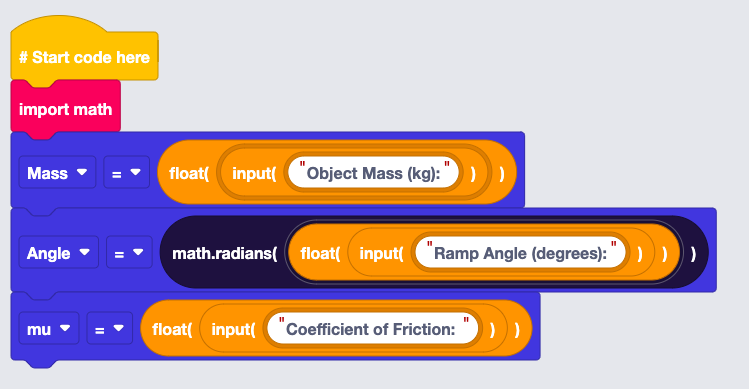
Before starting the lesson, ensure that your EduBlocks Classroom is set up and create an Assignment in your class. Provide the first few lines of code in the Starter Project.
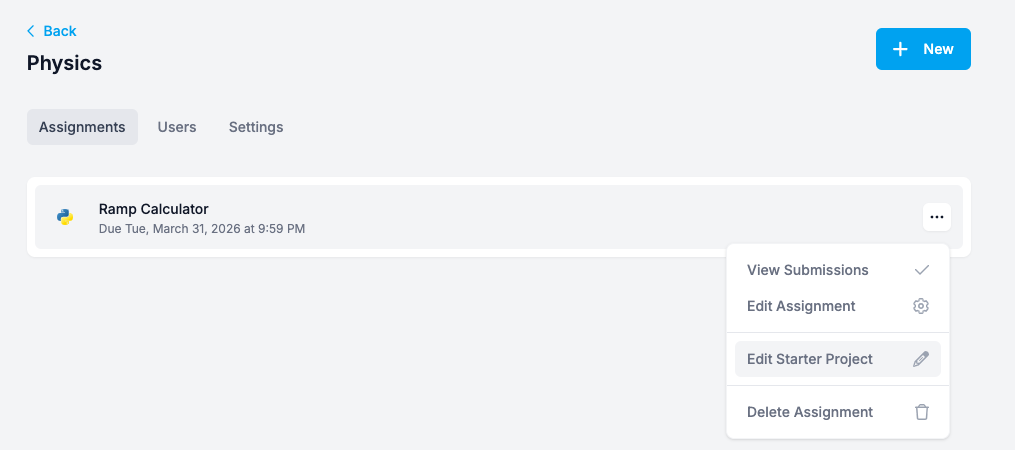
  1. If not already done, set up your EduBlocks account and create a Classroom for your class. Share the link to the Classroom with your students.
  2. Create an Assignment in EduBlocks for the “Ramp Calculator,” with your desired due date.
  3. Edit the Starter Project of the assignment to give the students something to build off of.
  4. Include as much or as little starting point as you would like. For my Starter Project, I included the following code:|


Introduce Inclined Planes

Using the slides provided, give the class an overview of how force calculations using inclined planes require a change in perspective from a flat surface, and how an object's weight on a ramp can be decomposed into a parallel and perpendicular component.

Feel free to use the slides provided (1-12), physical demonstrations, and/or worked examples on the board for the following lesson.

  1. Review net forces of objects on a flat plane. Using an example, remind students that normal force is always equivalent to the total force an object applies on a surface.
  2. Rotate their thinking. Introduce the concept of rotated co-ordinates by showing how most of the forces they will use are dependent on the angle of the ramp and independent of the traditional directions of “up” and “down.”
  3. Decompose the weight. Demonstrate how students can adapt the object’s weight to this new co-ordinate system by finding the x- parallel component and the y- perpendicular component of the force of gravity.
  4. Use weight to find normal force. Show that, since normal force is equal to the force applied towards the surface, the magnitude of the normal force must be equal to the magnitude of the weight’s perpendicular component.
  5. Find the object’s net force. Using the parallel component of the weight and the force of the ramp’s friction, show how to find whether an object is moving and that the net force is equal to this minuend of these two forces.
  6. Find the maximum angle of static friction. Using the definition of normal force and static friction, show that every friction interaction has a specific angle at which it will no longer be able to hold an object, equal to the arctangent of the coefficient of static friction.
  7. Worked example. There is an example question provided in the slides. Work the students through the logic to find the answer (0.39 kg, with a weight of 3.8 N).


Introduce Block Coding

Using the slides provided, give the students a brief overview of how block coding works and the logic of programming in Python, then provide the details for the assignment. Disregard this step if students in this class have prior experience with programming.

The following steps correspond to slides 13-20 of the provided slides. They introduce basic concepts of programming in Python. They can be skipped if students are familiar already with Python.

  1. The math library. Introduce students to the concept of a “library” of functions, then show the need for the math.py library in their code. Students should become familiar with the math.sin/math.cos functions, as well as the math.degrees and math.radians functions in order to convert degrees to radians and vice versa. Stress the importance of radians as the only angular unit that Python trigonometric functions will accept.
  2. Variables. Define variables, drawing from students’ prior experience with mathematics and physics. Have students consider what variables will be necessary when calculating for net force on a ramp.
  3. Input/Output. Show students the value of print functions, as well as taking input for variables. A few examples are provided. Additionally, introduce the concept of variable types, as they will need their values to be in the form of a float in order for the math to function properly.
  4. Conditionals. One aspect of this assignment is understanding that if the force of static friction exceeds the parallel component of weight, the object will not move. This means that they will need to understand how to use a conditional if/else function to provide optionality in their program.

After acquainting students with these basics, introduce the assignment:

Provide the .pdf of these slides to students to use as a reference when completing the assignment.

Student Work

Provide the students 1-2 in-class periods to work on this assignment. While they work, ensure that you are circulating the room to catch any student confusion or difficulty.

Provide the students 1-2 in-class periods to work on this assignment. While they work, ensure that you are circulating the room to catch any student confusion or difficulty.

If a student is stuck starting, provide them with an example question and ask them to record their process for solving it, step by step. This can help them to find the logic they will need for the program. If they get stuck on the logic, they can work together with classmates to find the solution, or you can provide more assistance with probing questions (e.g. “how does the angle affect the motion of the object?” “what is the equation for static friction? how does that relate to weight?” “what is the relationship between the angles of the normal force and the angle of motion?”)

For difficulties finding the proper way to translate mathematical logic to the code, be more liberal with assistance. As their programming ability is a secondary concern to their understanding of the basic logic of the problem, feel free to help them as much as necessary.

Lesson Feedback

Contact us

Having trouble? Let us know by completing the form below. We'll do our best to get your issues resolved quickly.

"*" indicates required fields

This field is for validation purposes and should be left unchanged.
Name*
Email*
?