Smart Recycling System: Building an AI-powered bin – SCOPES-DF

Author

David Fernandez Menendez

Summary

Students build, and program a smart recycling bin that automatically opens when a specific type of waste is recognised. Using a Micro:bit, a servo motor, and a machine learning model created with Teachable Machine, students explore how physical computing and artificial intelligence can be combined to solve real-world problems.

The lesson progresses from assembling the bin and manually controlling the servo, to training a machine learning model and integrating it into an automated system using serial communication and Make:AI Robots.

Students will:

  • Build a working electromechanical system
  • Program using variables, conditionals, and inputs/outputs
  • Train and test a machine learning model
  • Integrate AI into a physical prototype

Pre-lesson recommendation:

  • Basic introduction to Micro:bit and MakeCode
  • Understanding of inputs/outputs


What You'll Need

Materials and components:

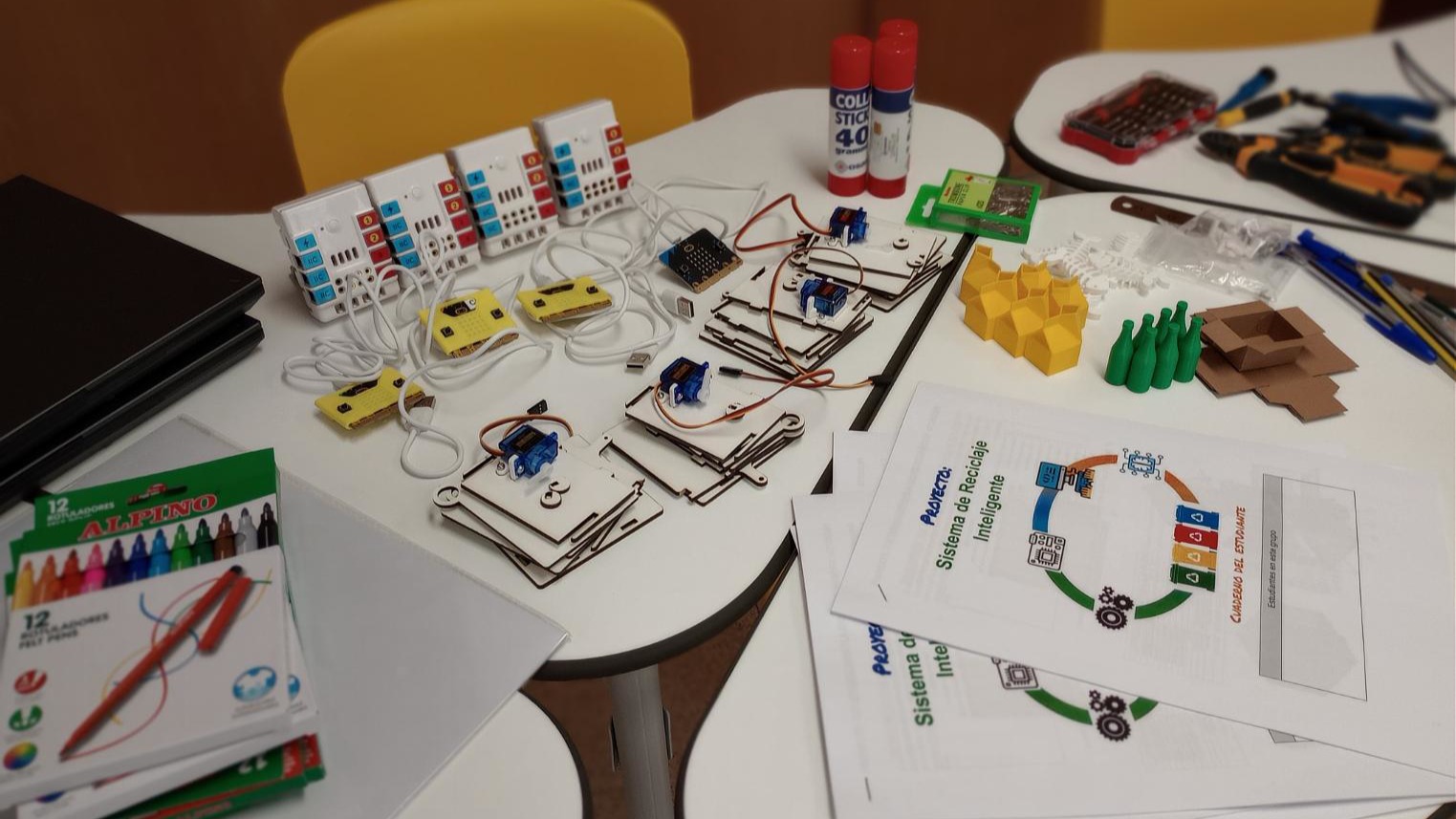
For each smart bin:

  • mini servo sg90 – 180º and servo horn
  • 3D printed servo bracket
  • x2 M2.5 bolt and nuts
  • x2 small self-tapping screws to attach servo to bracket
  • steel wire or paper clip for the linkage
  • laser cut pieces from 3mm MDF or plywood for the bin
  • card or paper for the labels

Items to represent waste (one of each per group):

Electronics:

  • Microbit v2
  • Nezha extension board
  • Charging lead
  • Laptop with camera


Tools: Side cutters, long nose pliers, screwdrivers


Markers or colouring pencils to design labels for the bins

Students workbook and teacher presentation
 

Learning Objectives

By the end of this lesson, students will be able to:

  • Investigate local recycling guidelines and classify everyday waste items according to their local recycling system.
  • Assemble a functional electromechanical prototype
  • Program a microcontroller using variables, conditionals, and event-based logic
  • Train and evaluate an image classification model
  • Integrate a machine learning model with a physical computing system


Reflection

I have included the answer to the reflection questions on my Fab Learning Academy diary. Link to Reflection Questions

The Instructions

Local Recycling Challenge

Students investigate the recycling guidelines used in their local area and apply this knowledge to sort everyday waste items into the correct recycling categories.

Provide students with access to local recycling information, such as the council website or a printed guide.

In pairs, ask them to identify the main recycling categories used in their area.

Then give each pair a set of everyday waste item cards and ask them to sort them according to the local recycling system.

Review the answers together and discuss any items that are more difficult to classify.

Assemble the Smart Bin

Students assemble the physical structure of the recycling bin and install the servo mechanism that will control the lid. They also connect the Micro:bit and expansion board, preparing the system for programming.

Check materials and tools

  • Ensure all components are available (servo, bracket, bin parts, Micro:bit, etc.)
  • Refer to the materials list

Assemble the bin structure

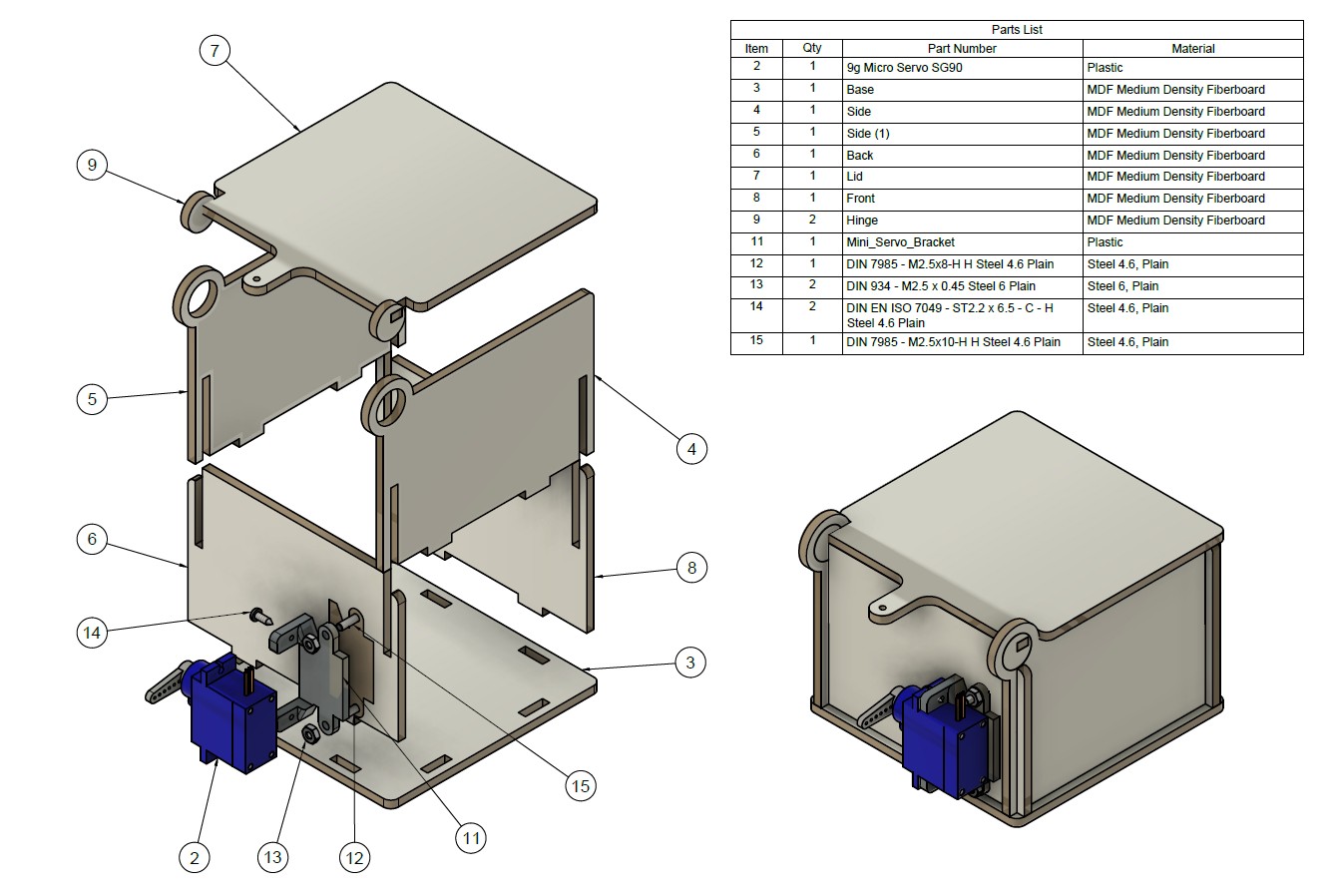
  • Follow the assembly diagram
  • Fit the laser-cut or pre-made parts together
  • Secure using screws where needed

Install the servo motor

  • Attach the servo to the bracket
  • Fix the bracket to the back of the bin
  • Ensure the servo arm can move freely

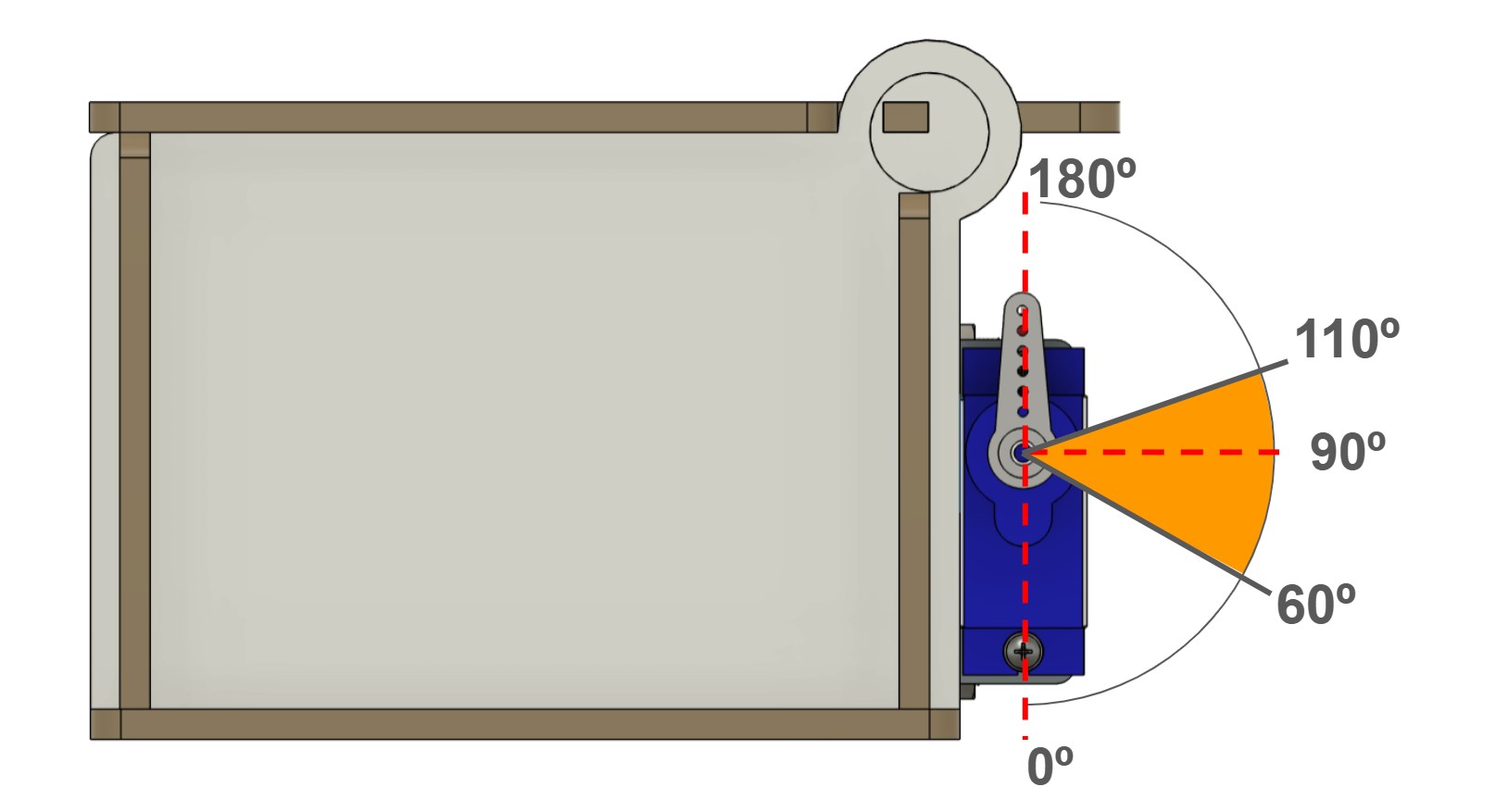
Understand servo positions

  • 0° → arm down
  • 90° → horizontal
  • 180° → vertical (starting position)
  • Correct positioning is essential for proper lid movement

Connect electronics

  • Connect the servo to the Nezha expansion board (S1 port)
  • Connect the Micro:bit to the computer via USB

Create the linkage

  • Use a paper clip or wire
  • Bend it to connect the servo arm to the lid
  • Test manually to ensure smooth movement


Program Manual Control

Students program the Micro:bit to manually open and close the bin using buttons. They learn about variables and how to control a servo motor.

Open MakeCode

Explain variables

  • A variable stores data (name, type, value)
  • Advantages: easier to understand, easier to modify and reduces errors
  • Ask students to create 2 variables: lid_open and lid_closed
  • Important: ensuresure that the name of the variables has no spaces or special characteres

Assign values

  • Example:
  • lid_closed = 110
  • lid_open = 60
  • These represent servo angles

Program behaviour

  • On start:
  • show icon
  • set servo to lid_closed
  • Button A: close lid
  • Button B: open lid

Download and test

  • Upload code to Micro:bit
  • Check if lid opens/closes

Adjust values

  • Modify angles if movement is incorrect


Train a Machine Learning Model

Students train an image recognition model using Teachable Machine to classify different types of waste.

Introduce machine learning

  • A machine learning model learns from examples to recognise patterns
  • It is part of Artificial Intelligence

Open Teachable Machine

Create classes

  • Example: glass, cardboard, containers, organic_waste, no_item

Collect data

  • Use webcam
  • Capture 100–180 images per class
  • Vary angles and lighting

Train the model

  • Click “Train Model”

Test the model

  • Show objects to camera
  • Check predictions

Improve model

  • Add better data if needed
  • Retrain

Export the model

  • Click “Export Model → Upload Model”
  • Copy the URL


Automate the System with AI

Students connect the trained model to the Micro:bit and automate the bin so it opens only for the correct type of waste.

Prepare Micro:bit code

  • Add block: “serial redirect to USB”
  • Create variable: SerialData

Read incoming data

  • Use: “serial read until new line”

Add conditionals

  • If SerialData = “glass” → show “glass”
  • If “cardboard” → show “card/paper”
  • etc.
  • Match class names: Must be identical to Teachable Machine labels

Add automation

  • For assigned category:
  • open lid
  • wait 5 seconds
  • close lid

Upload code to Micro:bit


Connect and test the System

Students connect the Micro:bit to the machine learning model using Make:AI Robots and test the full automated system.

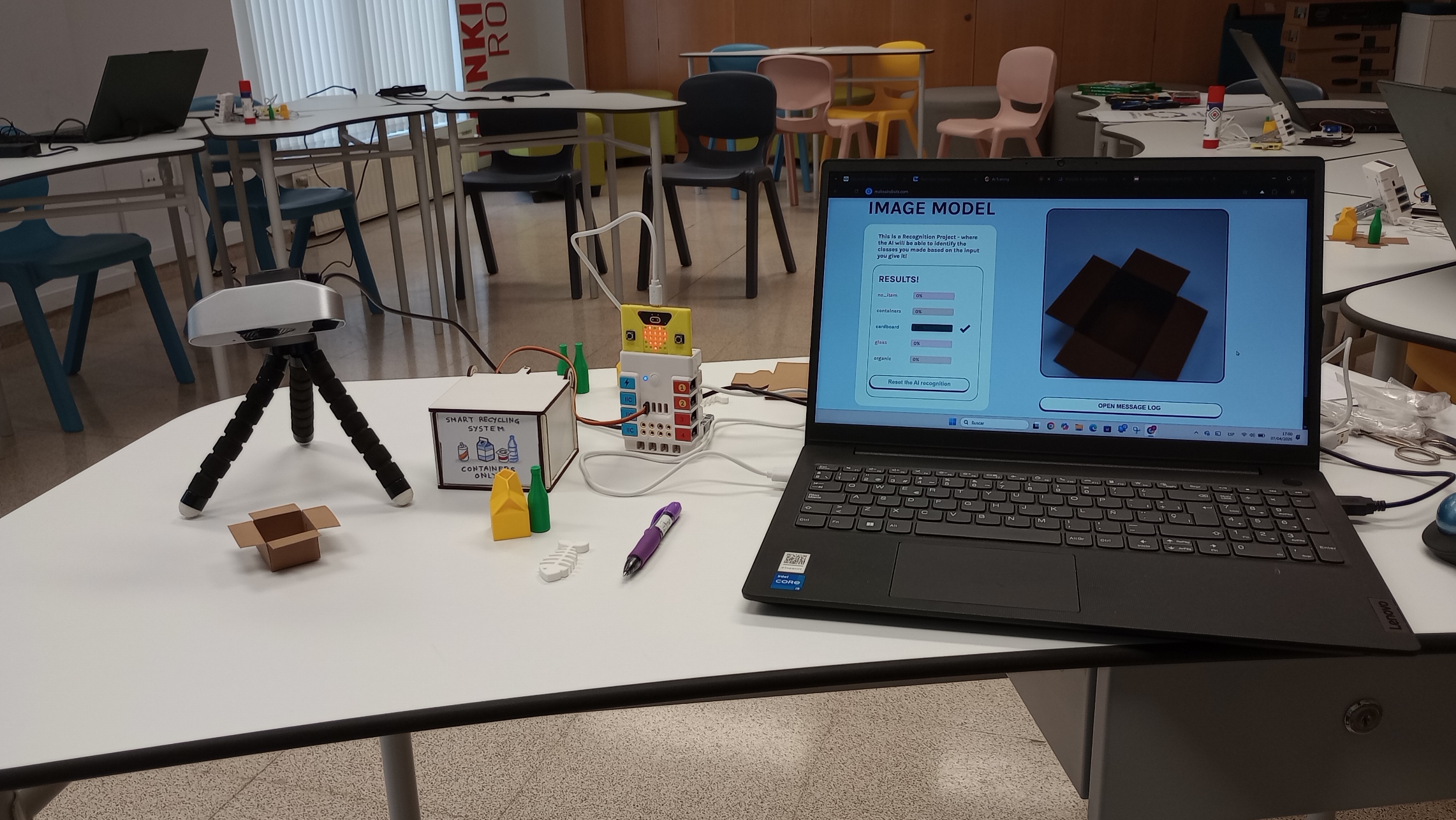
Open Make:AI Robots

Connect devices

  • Plug in Micro:bit
  • Select correct port

Paste model URL

  • Insert Teachable Machine link

Check camera

  • Ensure it is not used by other apps

Test system

  • Show different objects
  • Observe:
  • classification
  • servo movement

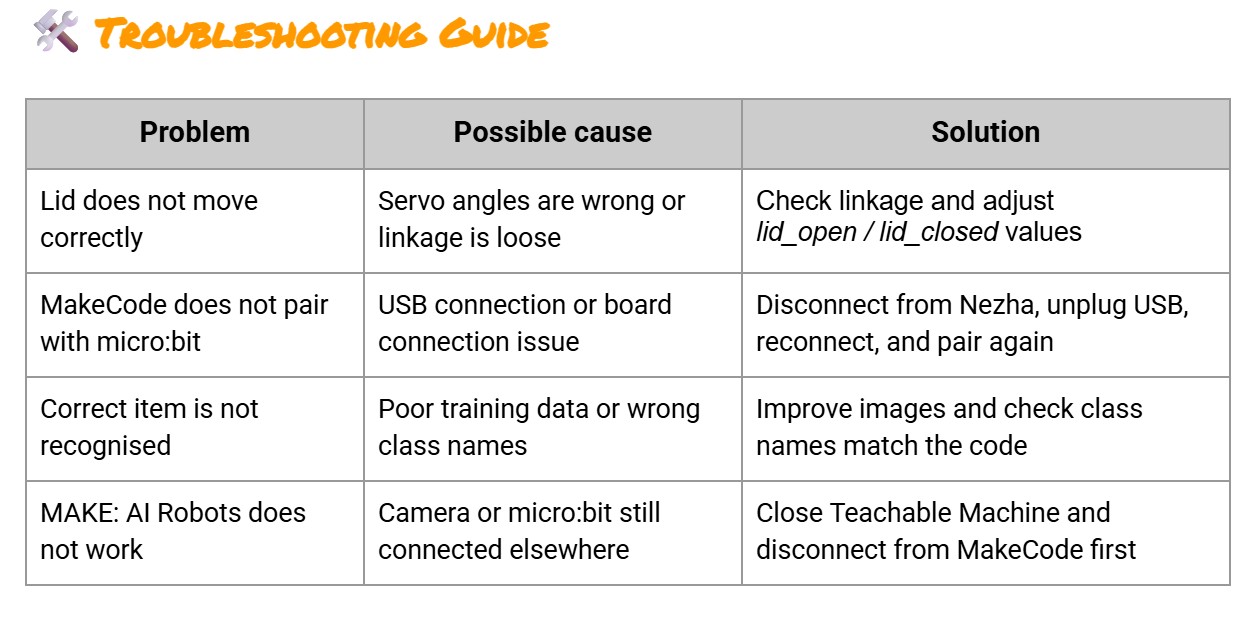
Debug issues

  • Check: wiring, code, model accuracy
  • Do names of classes in teachable machine match the names of categories in MakeCode?
  • Disconnect Micro:bit from MakeCode so it can be connected to MAKE:AI Robots
  • Disconnect webcam from other applications so it can be access by MAKE:AI Robots
  • Reset Micro:bit (press button at the back) and reconnect to MAKE:AI Robots


Reflection and improvement

Students evaluate their system, identify problems, and suggest improvements.

Reflect on performance

Identify issues
  • Hardware (servo, linkage)
  • Software (code errors)
  • Learning model (wrong predictions)


 Propose improvements

  • Better training data
  • Adjust servo angles
  • Improve bin design

Extension activity

  • Design and build a custom bin
  • Create labels for recycling categories
  • Add more outputs to the system: sound, icons, LEDS, 


Lesson Feedback

Contact us

Having trouble? Let us know by completing the form below. We'll do our best to get your issues resolved quickly.

"*" indicates required fields

This field is for validation purposes and should be left unchanged.
Name*
Email*
?