- Loading…

This hands-on workshop guides participants step by step through the process of building and running a portable local AI agent using a resource-constrained device such as the Arduino UNO Q.
تُرشد ورشة العمل العملية هذه المشاركين خطوة بخطوة خلال عملية بناء وتشغيل وكيل ذكاء اصطناعي محلي محمول باستخدام جهاز محدود الموارد مثل Arduino UNO Q.
.png)
Participants will learn how to navigate the board’s Linux terminal, execute essential Linux commands, configure the device, and implement a simple AI agent directly on the hardware. Along the way, they will explore the fundamentals of AI agents, understand the advantages of local AI, and discover the capabilities and limitations of the Arduino UNO Q.
سيتعلم المشاركون كيفية استخدام طرفية لينكس الخاصة باللوحة، وتنفيذ أوامر لينكس الأساسية، وتكوين الجهاز، وتطبيق وكيل ذكاء اصطناعي بسيط مباشرةً على الجهاز. وخلال ذلك، سيتعرفون على أساسيات وكلاء الذكاء الاصطناعي، ويفهمون مزايا الذكاء الاصطناعي المحلي، ويكتشفون إمكانيات وقيود أردوينو أونو كيو.
By the end of the workshop, participants will have practical experience developing a compact, private, and portable AI solution that can operate independently from cloud-based platforms.
بنهاية ورشة العمل، سيكتسب المشاركون خبرة عملية في تطوير حل ذكاء اصطناعي صغير الحجم وخاص وقابل للنقل يمكنه العمل بشكل مستقل عن المنصات السحابية.



Projector/Screen, Laptop, Internet Access, Arduino Uno Q boards.
A to Z guide on how to install your Local AI Agent on an Arduino Uno Q
This workshop encourages participants to reflect on the ethical implications of running AI directly on local devices. Unlike cloud-based systems, local AI agents can process information on the device itself, reducing the need to send personal data to external servers and offering greater control over privacy and security.
تشجع هذه الورشة المشاركين على التفكير في الآثار الأخلاقية لتشغيل الذكاء الاصطناعي مباشرةً على الأجهزة المحلية. فعلى عكس الأنظمة السحابية، تستطيع أنظمة الذكاء الاصطناعي المحلية معالجة المعلومات على الجهاز نفسه، مما يقلل الحاجة إلى إرسال البيانات الشخصية إلى خوادم خارجية، ويوفر تحكمًا أكبر في الخصوصية والأمان.
However, local AI is not automatically ethical. Participants must still consider how data is collected, how the system makes decisions, what biases may exist in the model, and who is responsible when the agent produces inaccurate or harmful results. The limited capabilities of small devices also highlight the importance of transparency: users should understand what the AI can and cannot do.
مع ذلك، لا يُعدّ الذكاء الاصطناعي المحلي أخلاقيًا بالضرورة. إذ لا يزال يتعين على المشاركين مراعاة كيفية جمع البيانات، وكيفية اتخاذ النظام للقرارات، وما قد توجد من تحيزات في النموذج، ومن يتحمل المسؤولية عندما يُنتج النظام نتائج غير دقيقة أو ضارة. كما تُبرز الإمكانيات المحدودة للأجهزة الصغيرة أهمية الشفافية: إذ ينبغي للمستخدمين فهم ما يستطيع الذكاء الاصطناعي فعله وما لا يستطيع.
By building a local AI agent, participants are encouraged to see ethical design as part of the technical process. Privacy, accountability, accessibility, energy consumption, and responsible use should be considered from the beginning, rather than added after the technology has already been developed.
من خلال بناء نظام ذكاء اصطناعي محلي، يُشجع المشاركون على اعتبار التصميم الأخلاقي جزءًا لا يتجزأ من العملية التقنية. وينبغي مراعاة الخصوصية والمساءلة وسهولة الوصول واستهلاك الطاقة والاستخدام المسؤول منذ البداية، بدلًا من إضافتها بعد تطوير التقنية.
Ask participants about their knowledge of AI and AI Agents اسأل المشاركين عن الذكاء الاصطناعي اسأل المشاركين عن وكلاء الذكاء الاصطناعي
Introduction & Icebreaking
Ask about AI (Ice breaking).

What is AI?
Artificial Intelligence (AI) is the ability of computer systems to perform tasks that usually require human intelligence, such as learning, problem-solving, understanding language, and making decisions, by processing data and recognizing patterns to adapt and improve performance without constant human intervention
ما هو الذكاء الاصطناعي؟
الذكاء الاصطناعي هو قدرة أنظمة الحاسوب على أداء مهام تتطلب عادةً ذكاءً بشريًا، مثل التعلم وحل المشكلات وفهم اللغة واتخاذ القرارات، وذلك من خلال معالجة البيانات والتعرف على الأنماط للتكيف وتحسين الأداء دون تدخل بشري مستمر.
What are AI Agents?
AI agents are intelligent systems designed to observe information, make decisions, and perform tasks toward a specific goal. Unlike traditional software that follows fixed instructions, AI agents can respond to changing inputs, select appropriate actions, and interact with users, tools, or digital environments. They can operate through cloud-based platforms or directly on local devices, depending on the level of privacy, connectivity, and computing power required.
ما هي أنظمة الذكاء الاصطناعي؟
أنظمة الذكاء الاصطناعي هي أنظمة ذكية مصممة لرصد المعلومات، واتخاذ القرارات، وتنفيذ المهام لتحقيق هدف محدد. على عكس البرامج التقليدية التي تتبع تعليمات ثابتة، تستطيع أنظمة الذكاء الاصطناعي الاستجابة للمدخلات المتغيرة، واختيار الإجراءات المناسبة، والتفاعل مع المستخدمين، والأدوات، والبيئات الرقمية. ويمكنها العمل عبر منصات سحابية أو مباشرةً على الأجهزة المحلية، وذلك حسب مستوى الخصوصية، والاتصال، وقوة الحوسبة المطلوبة.
What does Local means?
In this context, local means that the AI agent runs directly on the device rather than relying on a cloud-based platform or external server. The data is processed on the Arduino UNO Q itself, allowing the agent to operate with greater privacy, faster response times, and reduced dependence on an internet connection. However, local AI must work within the device’s limited memory and computing power, requiring efficient models and carefully designed tasks.
ماذا يعني مصطلح “محلي”؟
في هذا السياق، يعني “محلي” أن برنامج الذكاء الاصطناعي يعمل مباشرةً على الجهاز، بدلاً من الاعتماد على منصة سحابية أو خادم خارجي. تتم معالجة البيانات على لوحة أردوينو أونو كيو نفسها، مما يسمح للبرنامج بالعمل بمزيد من الخصوصية، وسرعة استجابة أعلى، وتقليل الاعتماد على اتصال الإنترنت. مع ذلك، يجب أن يعمل الذكاء الاصطناعي المحلي ضمن حدود ذاكرة الجهاز وقدرته الحاسوبية المحدودة، مما يتطلب نماذج فعّالة ومهام مصممة بعناية.

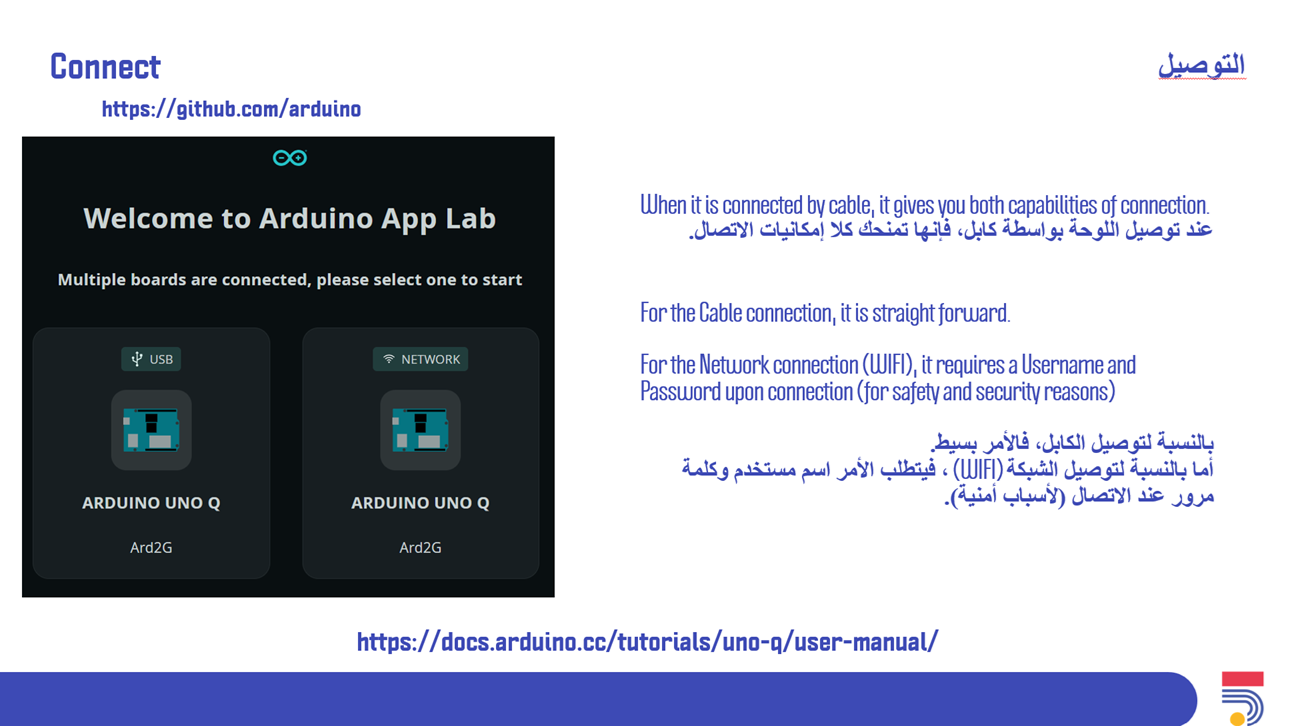
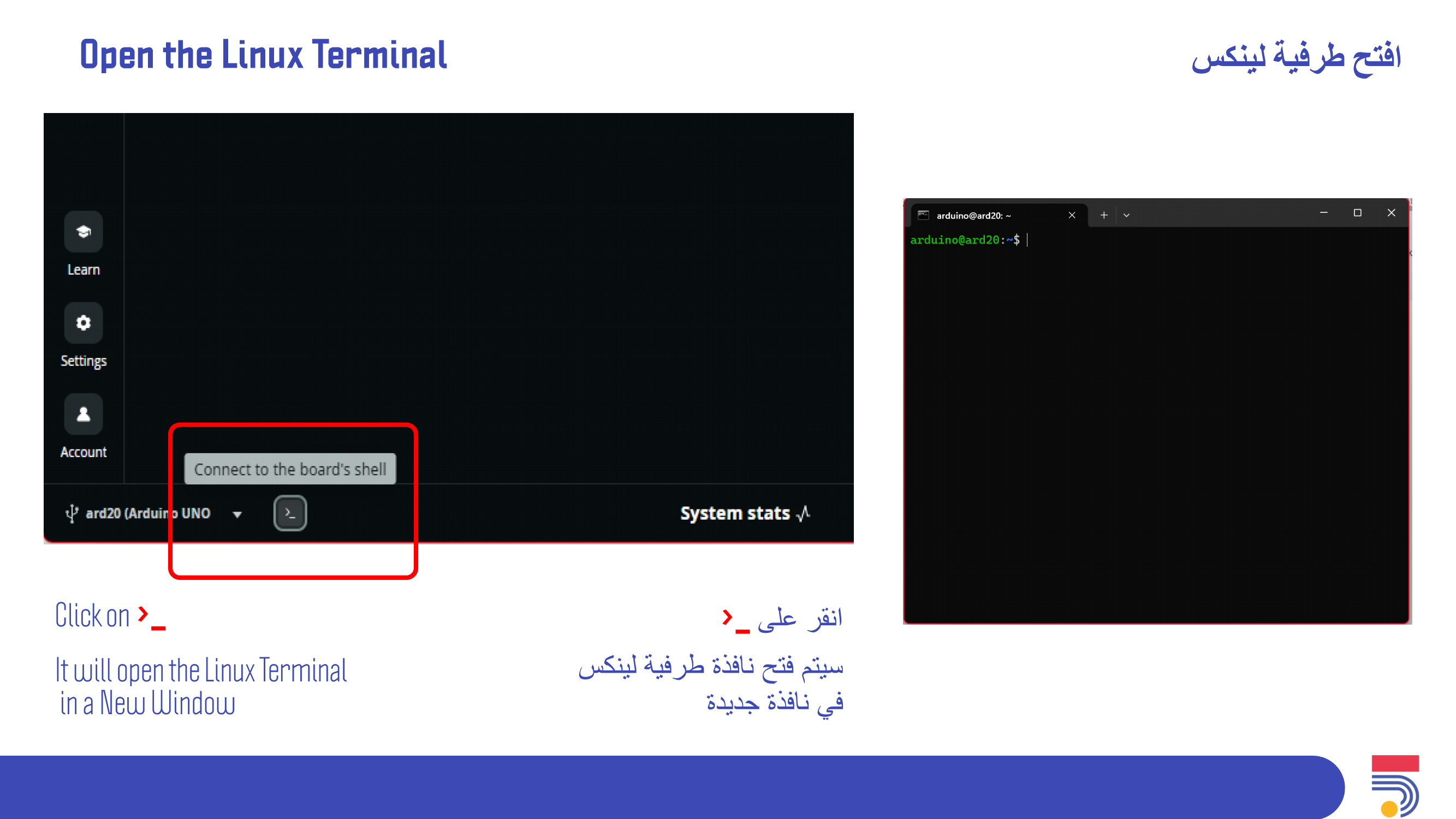
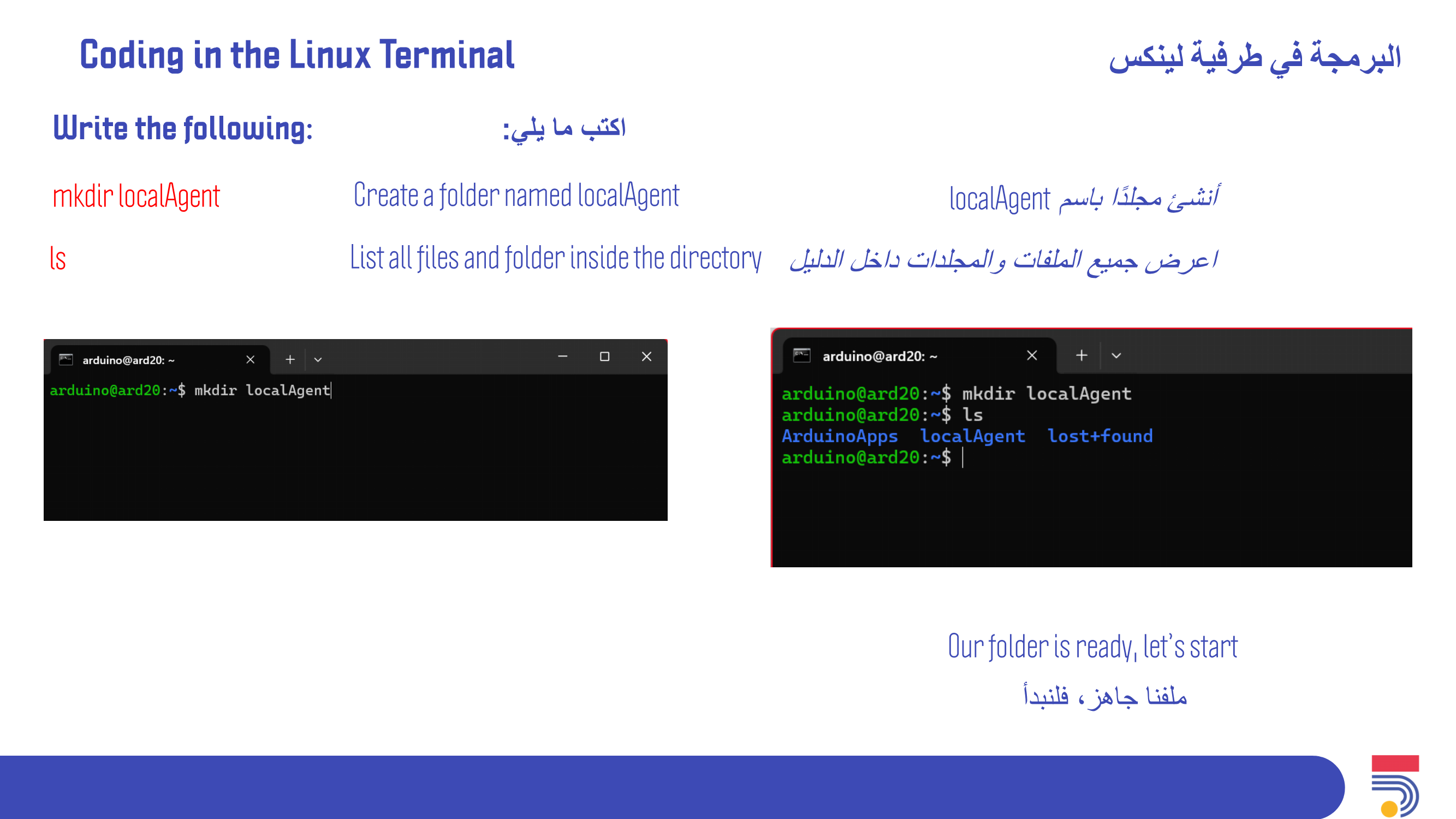
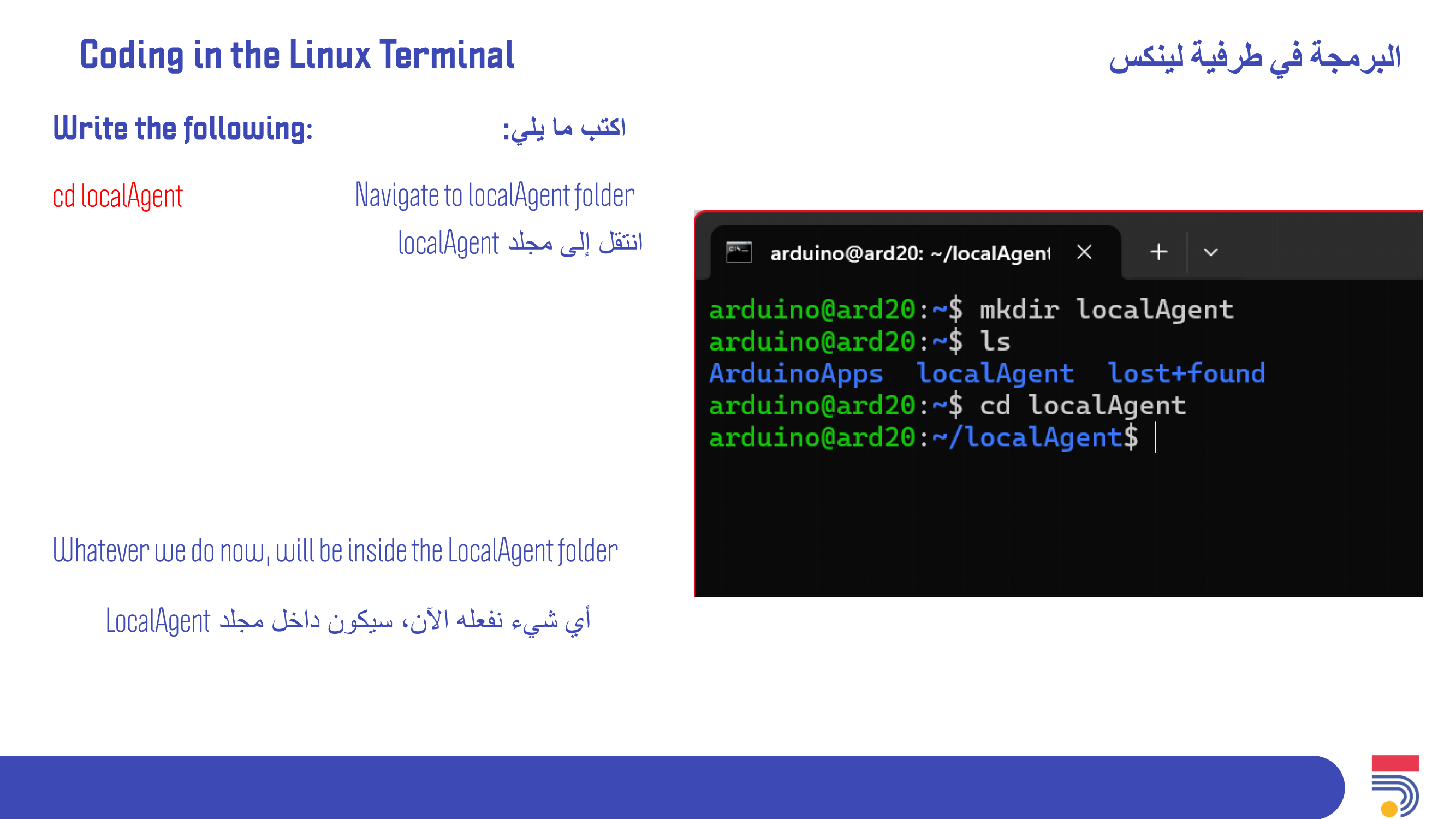
Download and Install AppLab to start. Coding in Linux Terminal: This section guides participants to navigate and create directories
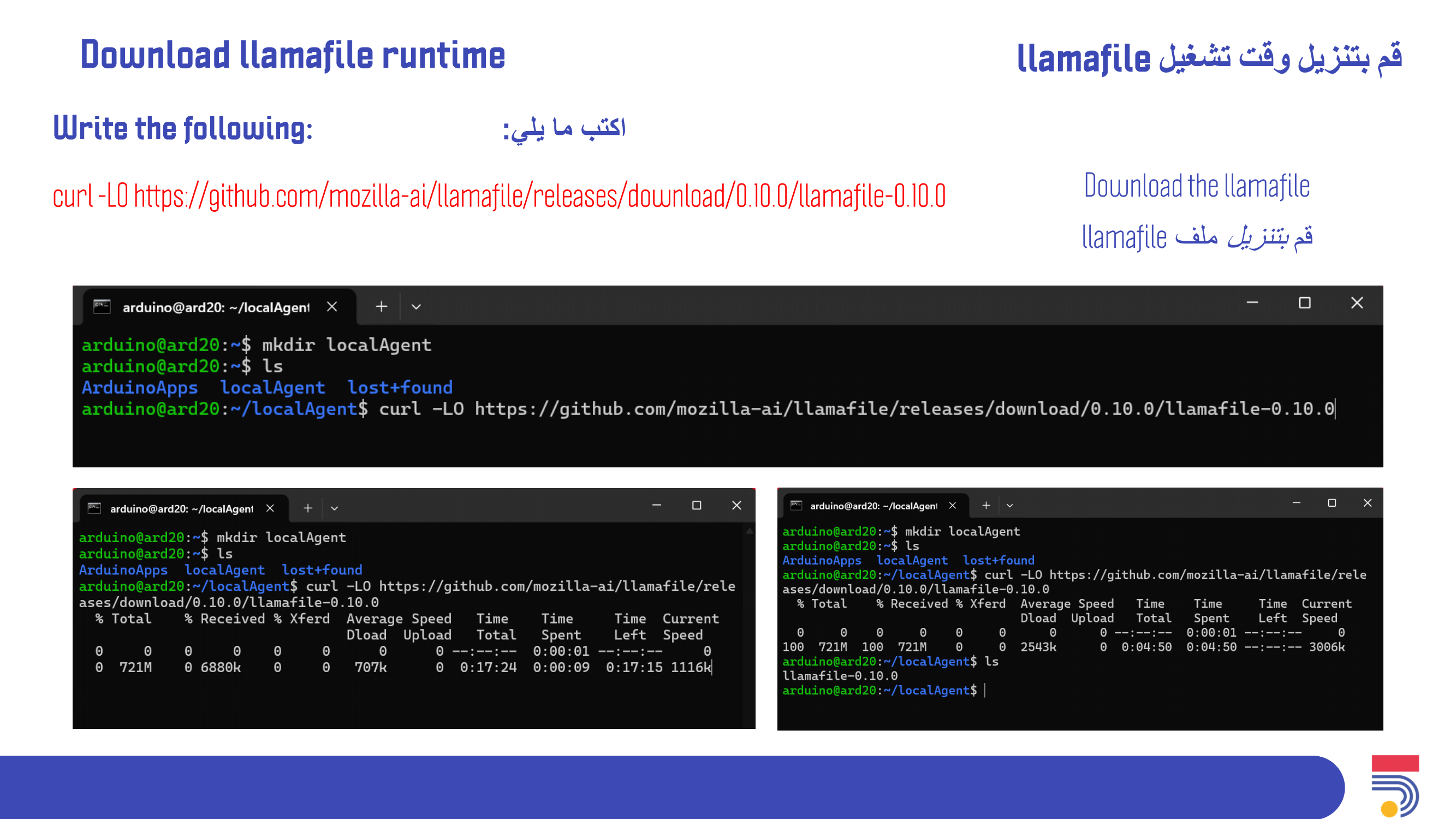
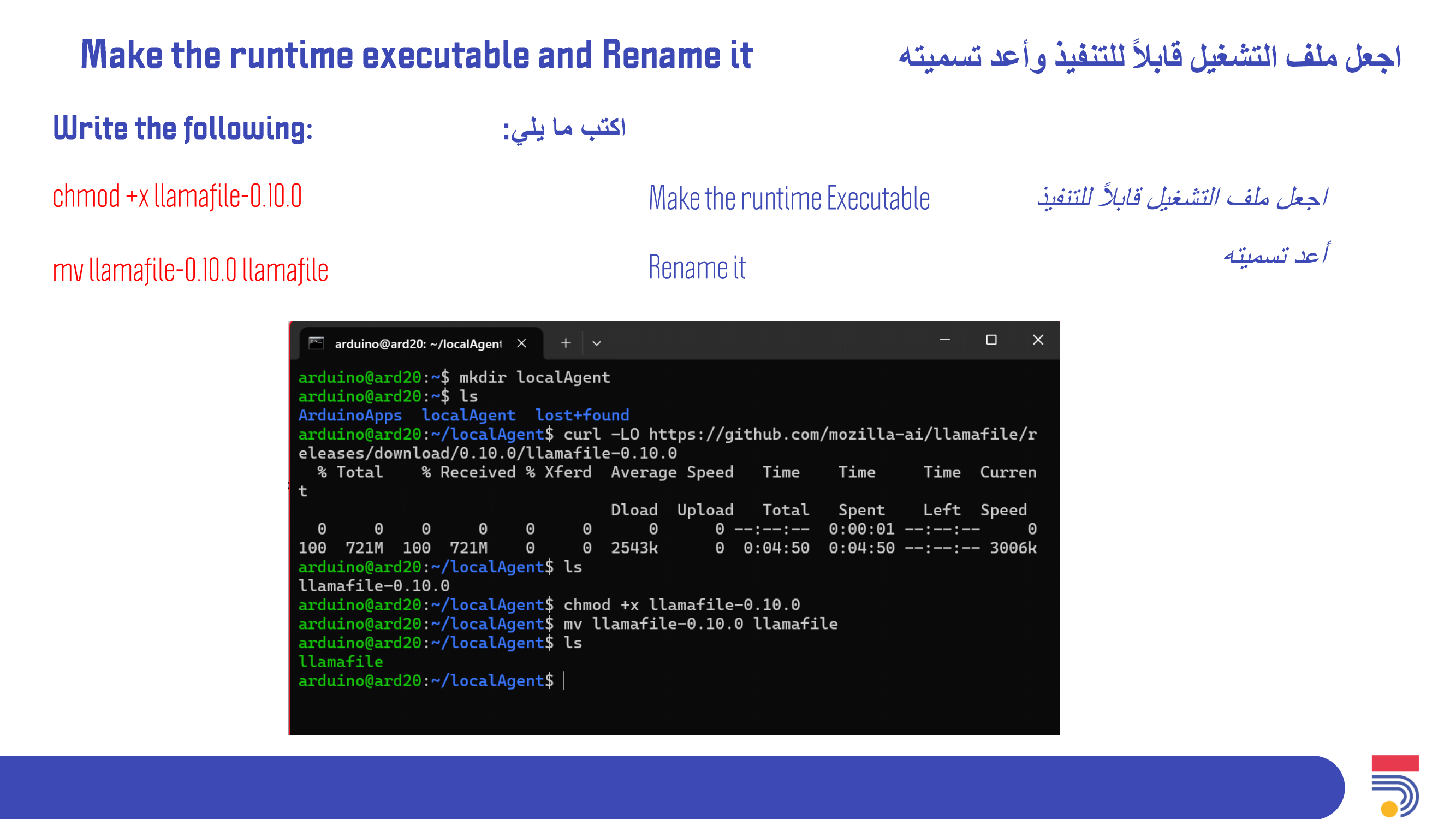
Download llamafile runtime and make it executable in Linux Terminal: This section guides participants to download llamafile runtime and make it executable
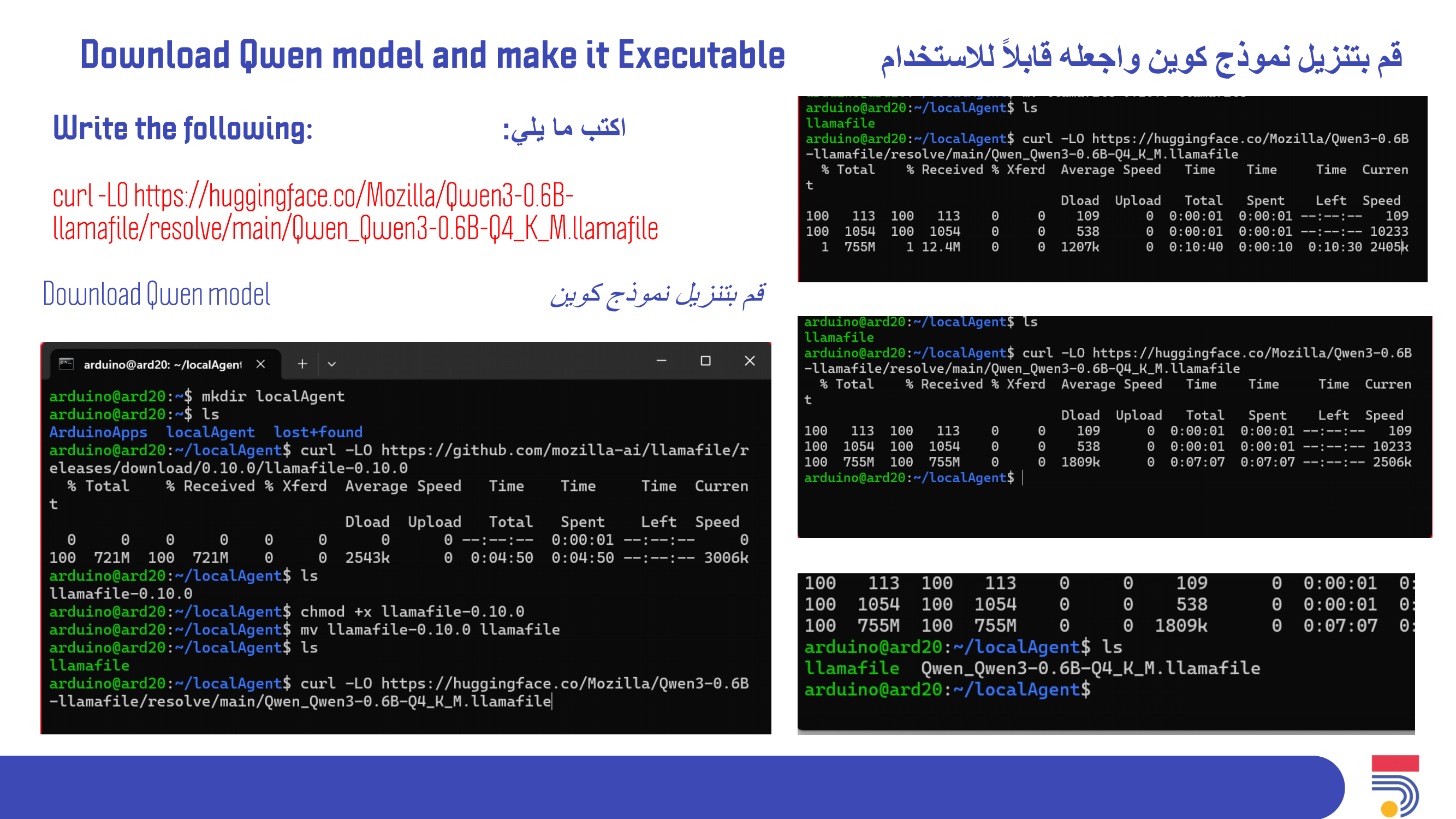
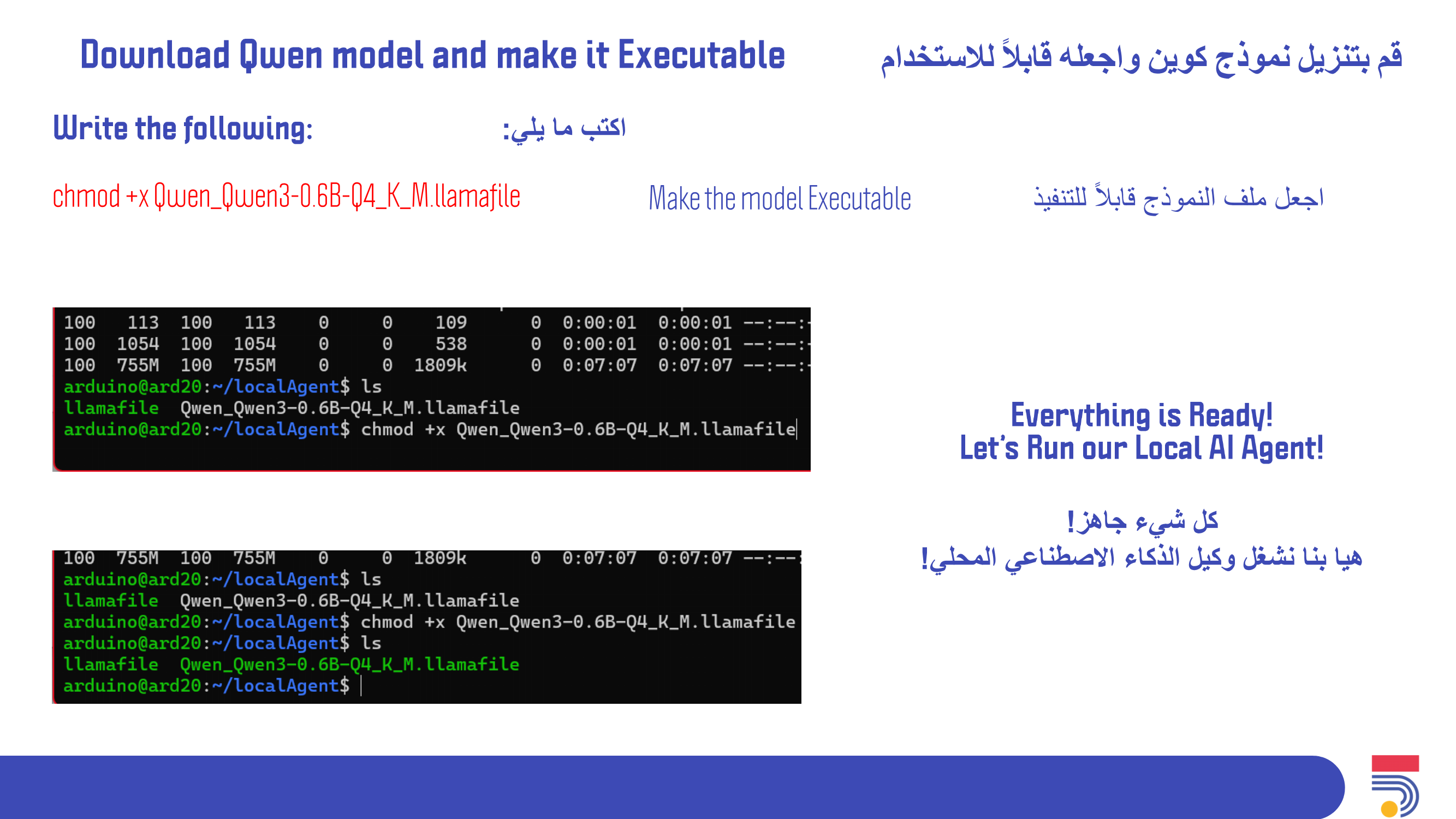
Download Qwen model and make it executable in Linux Terminal: This section guides participants to download Qwen model and make it executable
Start the Local AI Agent from Linux Terminal
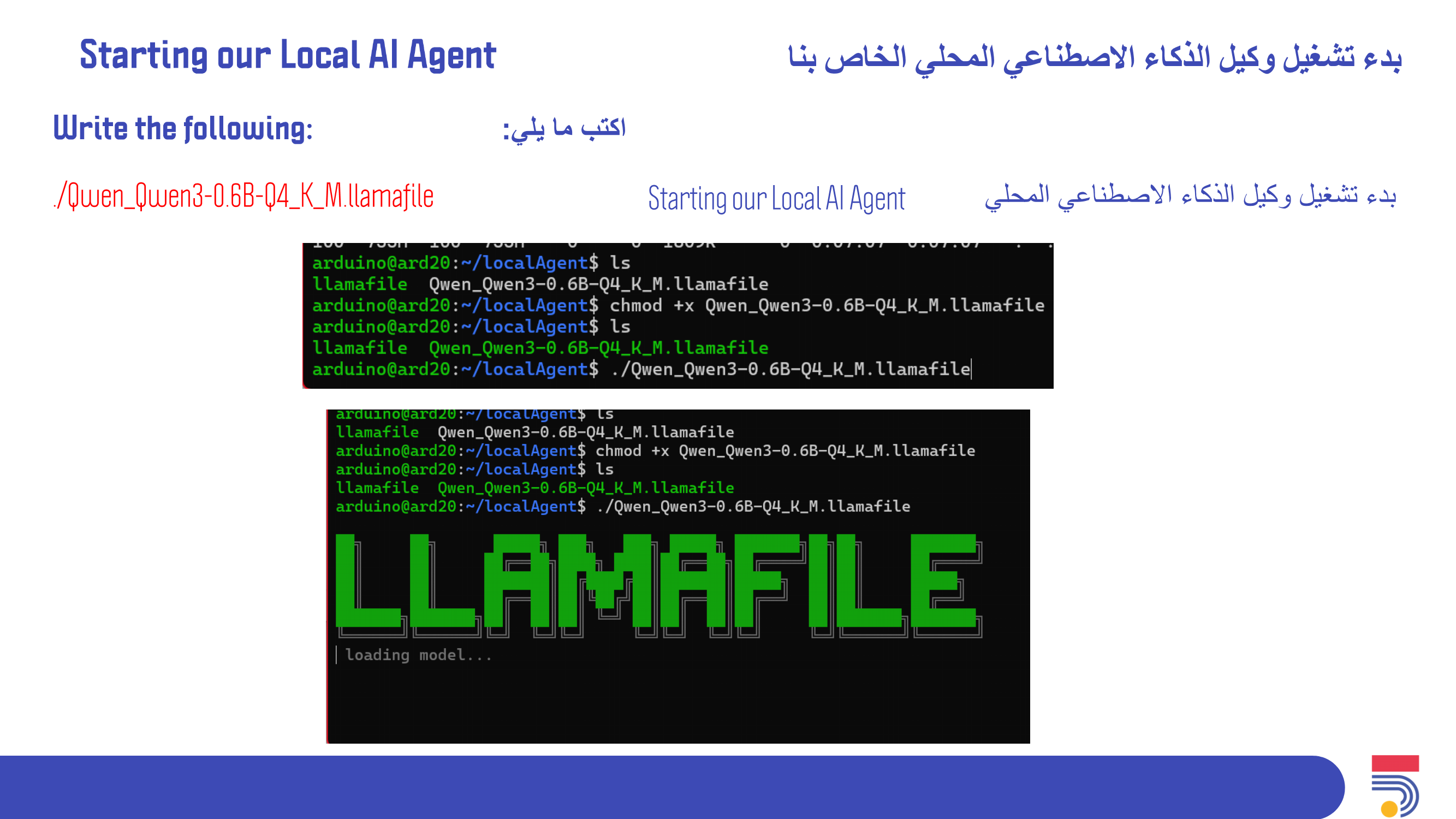
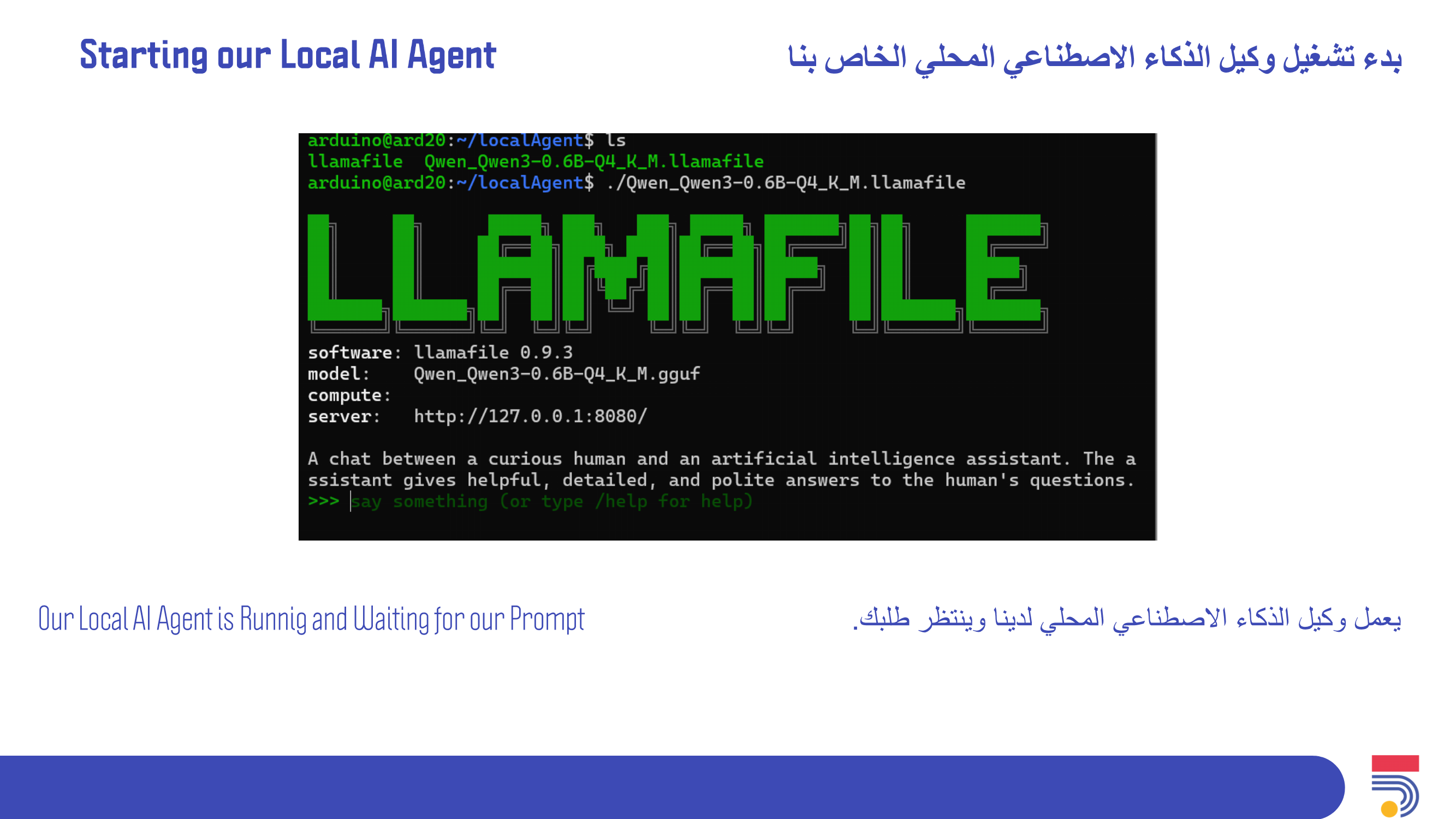
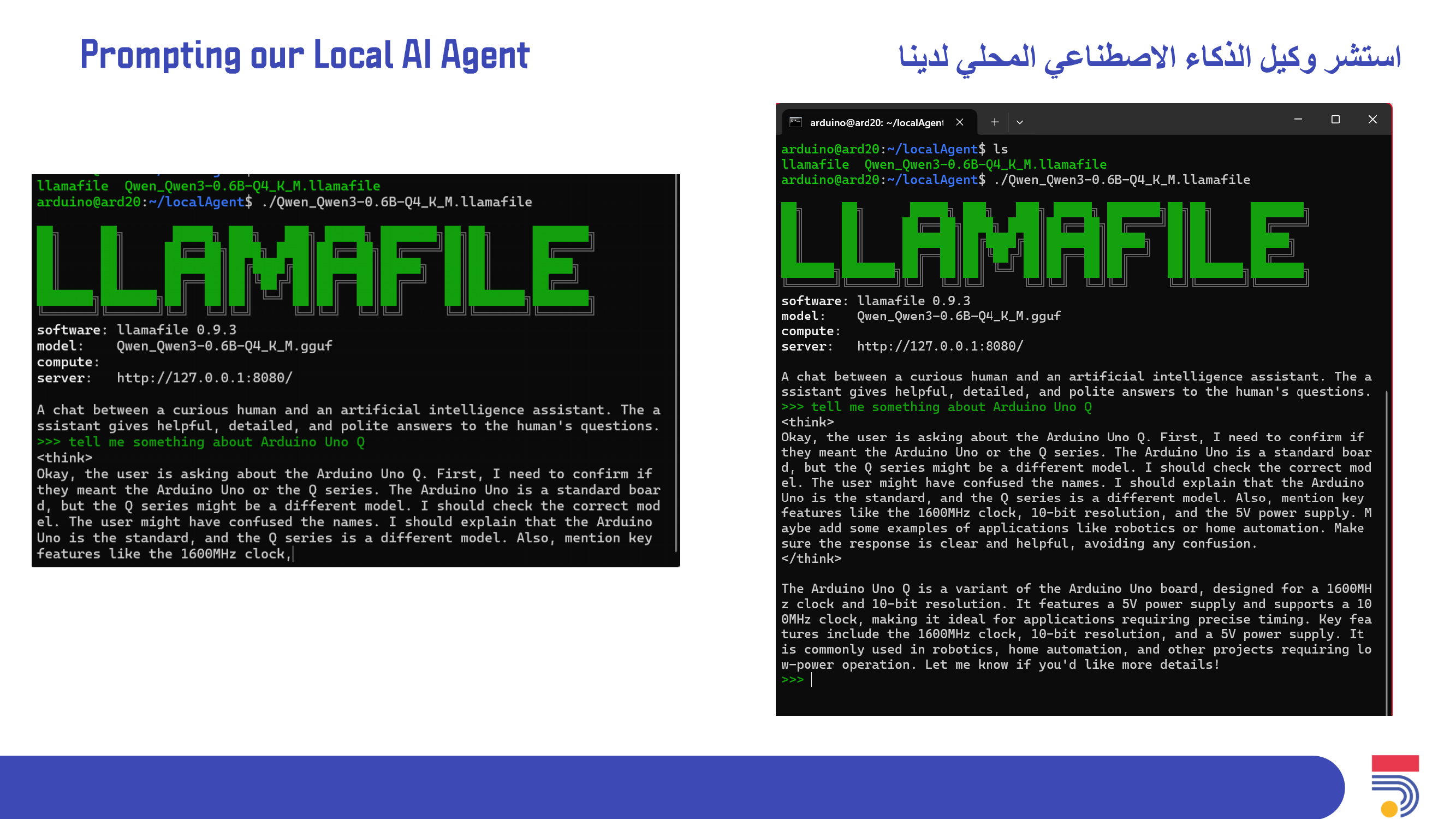
Prompt the Local AI Agent by writing your question and waiting for the answer
Inside the Linux Terminal: Copy each line Paste inside the Terminal Press Enter Continue to the next line when the previous is done already.
mkdir localAgent
cd localAgent
curl -LO https://github.com/mozilla-ai/llamafile/releases/download/0.10.0/llamafile-0.10.0
chmod +x llamafile-0.10.0
mv llamafile-0.10.0 llamafile
curl -LO https://huggingface.co/Mozilla/Qwen3-0.6B-llamafile/resolve/main/Qwen_Qwen3-0.6B-Q4_K_M.llamafile
chmod +x Qwen_Qwen3-0.6B-Q4_K_M.llamafile
./Qwen_Qwen3-0.6B-Q4_K_M.llamafile
Take some time at the end to check on the participants, how they will apply this new knowledge and final considerations. خصص بعض الوقت في النهاية للاطمئنان على المشاركين، وكيف سيطبقون هذه المعرفة الجديدة، والاعتبارات النهائية.
How will you apply this new knowledge?

To conclude the session, participants will reflect on the process of building a local AI agent and discuss the balance between technical performance and responsible design. They will review how local processing can support privacy, independence, and greater control over data, while also considering the limitations of small devices. The session will end by encouraging participants to think critically about how local AI agents can be developed and applied in ethical, practical, and meaningful ways.
في ختام الجلسة، سيتأمل المشاركون في عملية بناء وكيل ذكاء اصطناعي محلي، ويناقشون التوازن بين الأداء التقني والتصميم المسؤول. سيستعرضون كيف يمكن للمعالجة المحلية أن تدعم الخصوصية والاستقلالية والتحكم الأكبر في البيانات، مع مراعاة قيود الأجهزة الصغيرة. ستُختتم الجلسة بتشجيع المشاركين على التفكير النقدي في كيفية تطوير وكلاء الذكاء الاصطناعي المحليين وتطبيقهم بطرق أخلاقية وعملية وفعّالة.
Having trouble? Let us know by completing the form below. We'll do our best to get your issues resolved quickly.
"*" indicates required fields