- Loading…
In this lesson, the students use Scratch to create and sequence digital story scenes in pair. Through this hands-on activities, students practice using time connectives (First, Next, Then, Finally) and past tense verbs while developing basic computational thinking and communication skills. It is a good start to identify the basic structure of a story: beginning, problem, action and ending(solution). This will help the students to develop their language skills expecially the organisational structure of a narrative text.
The use of Scratch enhances pupil engagement and motivation and supported diverse learners through visual, interactive storytelling. It provides pupils with opportunities to apply language skills meaningfuly while developing collaboration, creativity and digital literacy (simple programming skills).
This lesson is planned to align with the syllabus in Singapore https://www.moe.gov.sg/-/media/files/primary/2020-english-language-primary.pdf
Laptops/iPads with Scratch
Headphones
Digital Storytelling PDF (PPT with Story Boarding worksheet and Instructions)
By the end iof the lesson, students will be able to:
Starting with Scratch – Join Scratch and Explore
Working with a class of 40, I tried to think of ways and means to carry out this lesson.
As I met my students’ parents at the beginning of the year, I enlisted their help by asking them to use their emails for their kids to join Scratch.
I used flipped learning to get the students to create a simple task on “About Me”. They watched a video by the Scratch Team. They explored and worked on the task. It was a great way to get them started, especially with a tight curriculum in the school. All joined and were eager to present.
Application of basic story structure (Beginning, Problem, Action and Ending), time connectives and past tense in storyboarding
The students generally could identify the story structure and use the time connectives and past tense in storyboarding. They enjoyed the activity and came up with interesting stories as shown in the examples below:
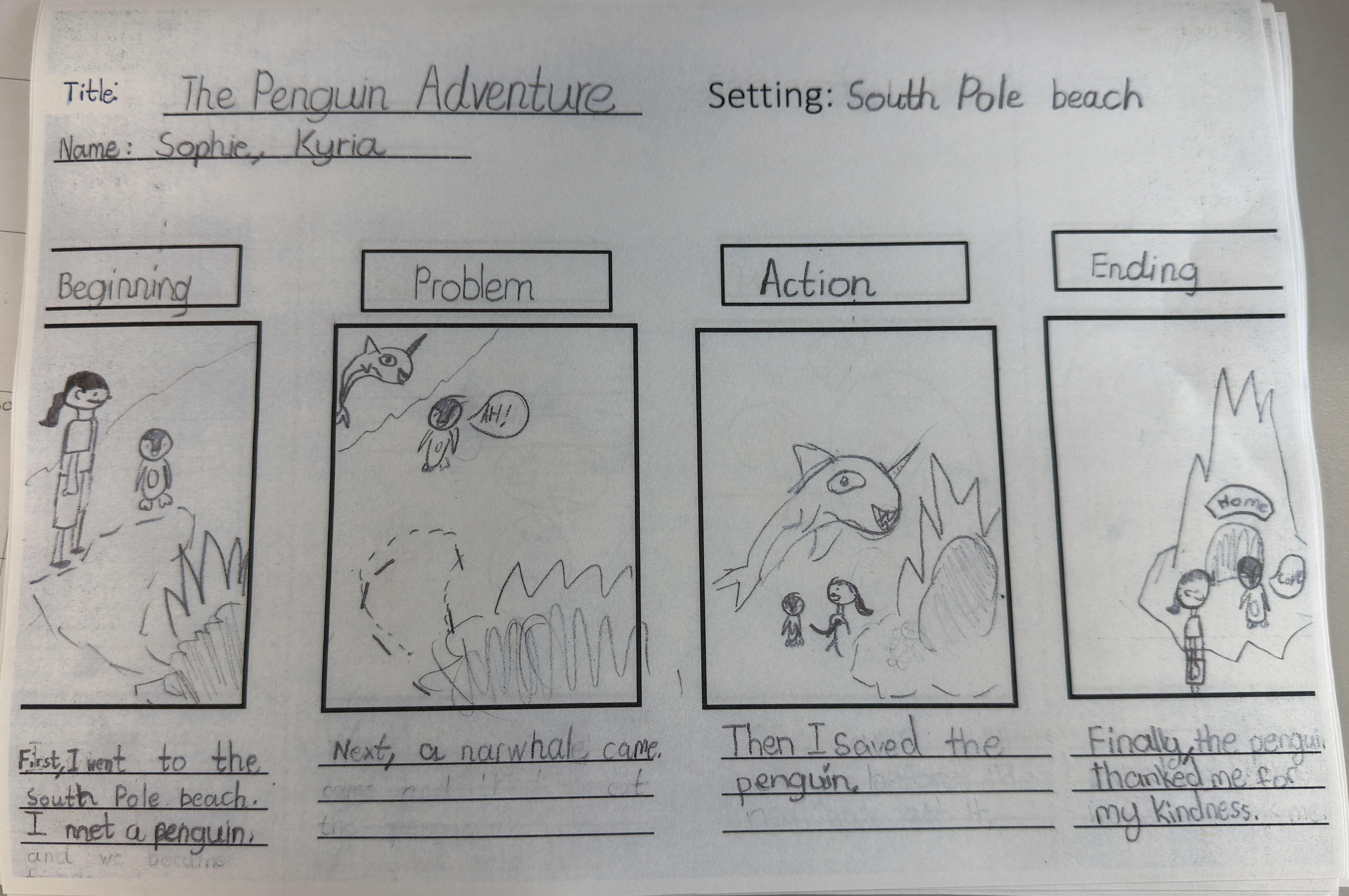
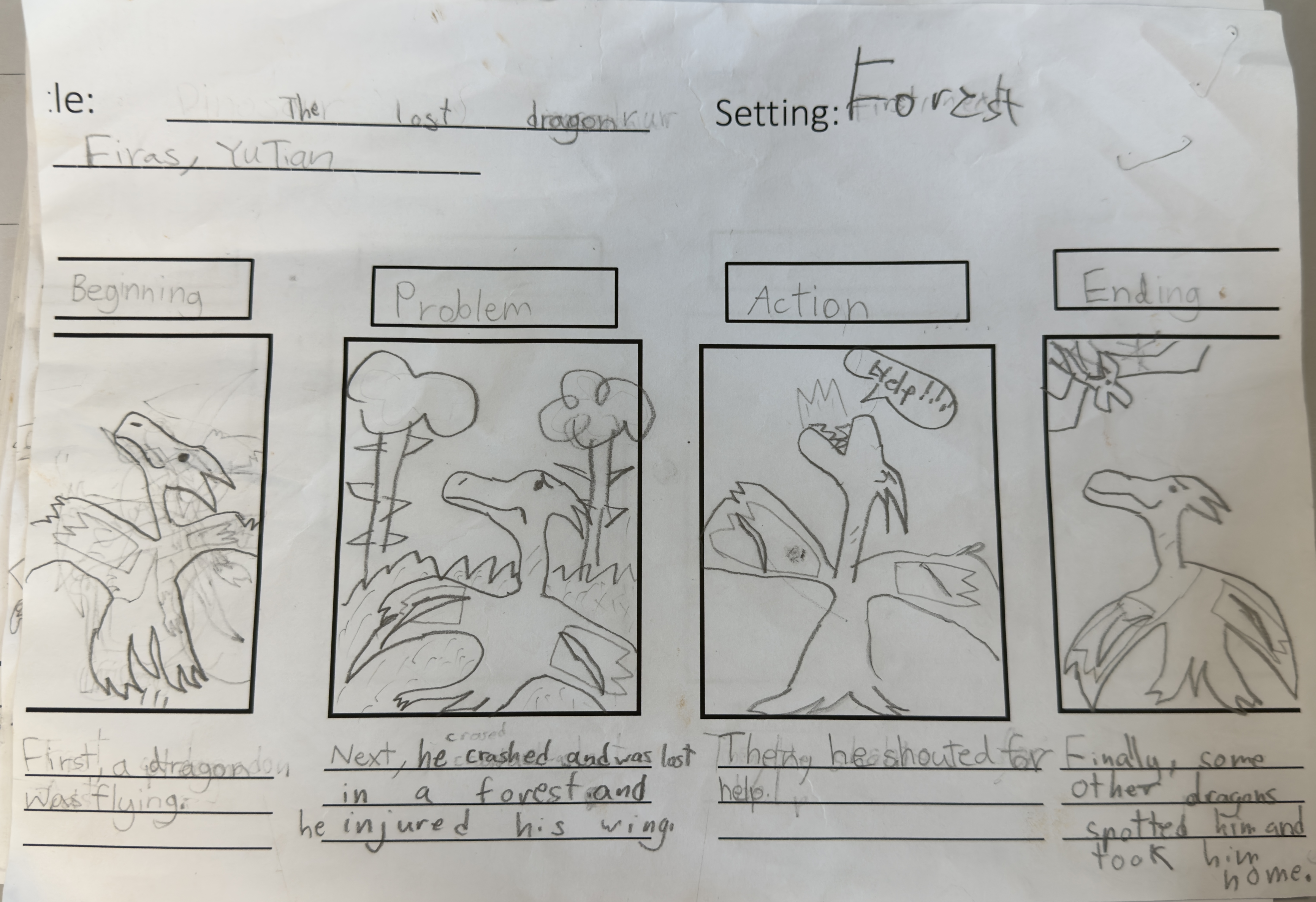
Though the stories are very interesting, the students would have problems trying to get the sprites for the suitable characters. I have told them to be flexible and make changes to the setting or characters but not the story. I needed to ask them to change the statements into dialogues. It seemed quite confusing for them. Maybe I should have given them speech balloons instead.
From the storyboarding, I noticed that students were comfortable coming up with stories of their own level. This activity supported diverse learners.
Creation of the 4-scene using Scratch
Though the students created the storyboard in pairs, I have decided to ask them to create on the Scratch individually based on the same story created with their partners. This would allow creativity and variations.
Creating the 4-scene on Scratch is not easy for the students. They took a much longer time than planned. I was not able to complete within one lesson.
Challenges faced:
Solutions for the above challenges:
Student’s work
What are we learning: To: -Identify basic story structure: Beginning, Problem, Action and Ending) -Use time connectives (first, next, then and finally) to arrange events -Write simple past tense sentences for each scene (dialogues) Refer to PPT slide #1 to #7
Work in pairs, creation of a story using storyboarding worksheet. Print Worksheets PPT slide #8 and #9 for mid progress learners. Print Worksheets PPT slide #10 and #11 for high progress learners. Slide #12 - Samples of Storyboarding
Differentiated Instructions and worksheets are given for mid and high progress learners –
PPT slide #8 and #9 for mid progress learners.
PPT slide #10 and #11 for high progress learners.
Creating 4-scene animated story with Scratch Using I Do, We Do and You do strategy.
I Do, We Do
You do
Mid-Progress Learners – can just follow the same requirements stated above
High- Progress Learners – add motion, sound effects, add more events.
Slide #13 – Rsources for joining, sharing Scratch and creating in Scratch
Slide #14 to 19 – Instructions for creating the 4-scene animated story
Having trouble? Let us know by completing the form below. We'll do our best to get your issues resolved quickly.
"*" indicates required fields